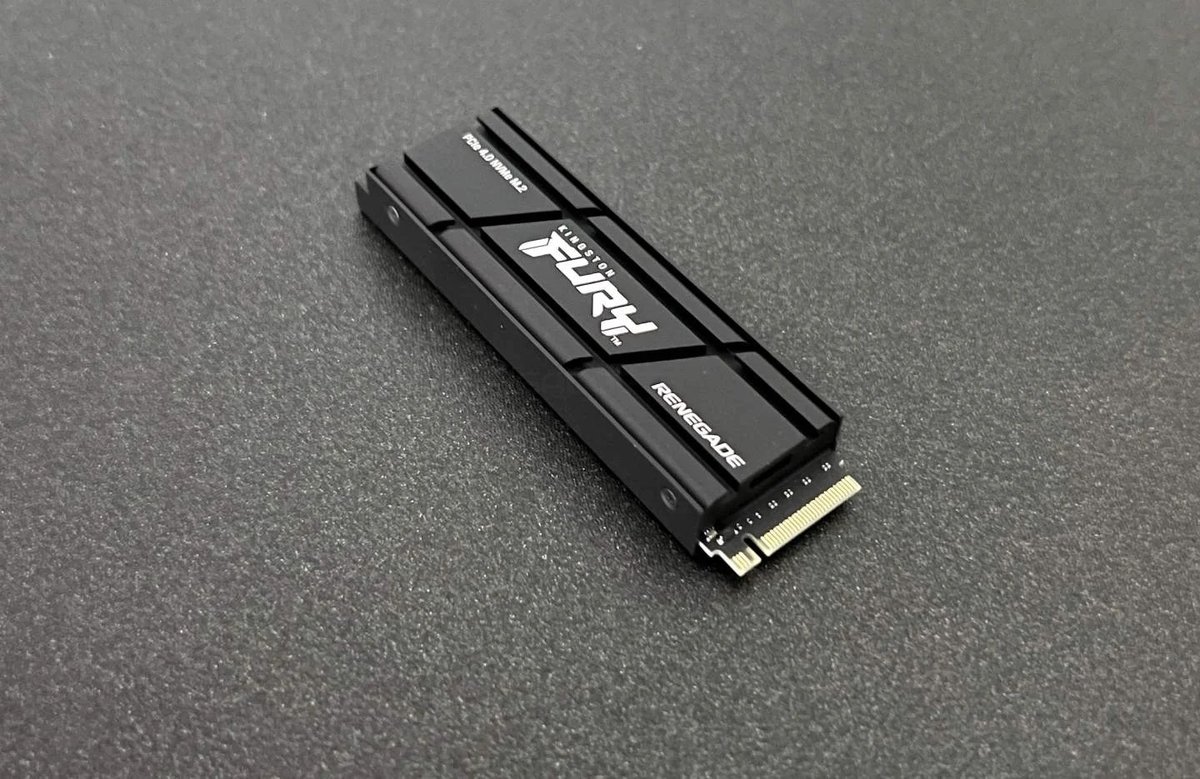
In today's high-performance computing world, speed is paramount. Modern NVMe Solid State Drives (SSDs) have revolutionized storage, offering blazing-fast speeds that were unimaginable just a few years ago. But with great speed often comes a significant byproduct: heat. This leads many users to wonder: is an SSD with a heatsink truly worth the investment for their system?
The answer, as with many tech questions, isn't a simple yes or no. It depends heavily on your specific SSD, your usage patterns, and your system's overall thermal environment. However, for a growing number of users, particularly those pushing their systems to the limit, a heatsink isn't just a nice-to-have; it's a critical component for maintaining peak performance and even extending the lifespan of their valuable storage.
The Hidden Threat: How Heat Can Slow Down Your SSD
Modern NVMe M.2 SSDs, especially the latest PCIe Gen4 and Gen5 drives, are incredibly powerful. They can transfer data at speeds reaching 7,000 MB/s or more. But during intense operations like large file transfers, game loading, or video editing, these tiny powerhouses generate substantial heat. Without adequate cooling, this heat can build up rapidly, causing internal components like the controller chip and NAND flash memory to reach critical temperatures.
When an SSD gets too hot, its internal firmware triggers a safety mechanism called "thermal throttling." This isn't a malfunction; it's a built-in protection designed to prevent permanent damage to the drive. However, the consequence is a drastic reduction in performance. Your SSD might suddenly slow down from its advertised 7,000 MB/s to a mere 800 MB/s or less, leading to frustrating slowdowns, longer loading times, and even in-game stuttering. To dive deeper into what happens behind the scenes, read our dedicated guide on Understanding SSD Thermal Throttling.
What an SSD Heatsink Actually Does (and Why It Matters)
An SSD heatsink is a straightforward yet effective solution to this heat problem. Typically made of aluminum or copper, it acts as a passive cooling device. A thermal pad connects the heatsink directly to the SSD's hottest components, drawing heat away from them. The heatsink then dissipates this heat into the surrounding air, keeping the drive's temperature within a safe, optimal range (often 55-65°C under load).
By preventing thermal throttling, a heatsink ensures your SSD can consistently sustain its peak performance and deliver the advertised speeds you paid for. It allows your drive to operate efficiently, preventing the frustrating performance drops that uncooled drives can experience during demanding tasks. Beyond raw speed, maintaining lower operating temperatures can also contribute to the long-term health and potential lifespan of your SSD.
The Clear Cases: When an SSD Heatsink Is Truly Essential
For certain users and specific SSDs, a heatsink is not just recommended, it's often a necessity to unlock the full potential of their hardware. If any of these scenarios describe your setup or usage, you should strongly consider adding a heatsink:
- High-Performance NVMe M.2 SSDs: This is the most critical category. PCIe Gen4 and especially Gen5 drives, with their blistering speeds (7,000 MB/s and up), produce significant heat that almost always requires active cooling.
- Intense Gaming: Modern AAA games often involve continuous asset streaming and large data loads. For a smooth, lag-free experience, particularly if you're upgrading your PlayStation 5 (where Sony explicitly mandates a heatsink), it's crucial.
- Content Creation & Professional Workloads: If you're frequently engaging in video editing, 3D rendering, graphic design, or photography with massive files, your SSD will be under constant, heavy load. A heatsink will maintain stable performance throughout these demanding tasks.
- Small Form Factor (SFF) PCs or Poor Airflow Cases: Compact PC builds look great but often have limited internal airflow. This traps heat, making a heatsink even more important for your SSD's longevity and performance.
- Regular, Large File Transfers: If you constantly move gigabytes or terabytes of data, your SSD will be running hot for extended periods. A heatsink ensures these transfers don't slow down midway due to overheating.
Understanding your usage is key to determining if a heatsink is a must-have. We cover all these specific scenarios in detail in our article on When an SSD heatsink is necessary.
When You Likely Don't Need an SSD Heatsink
While heatsinks are beneficial, they're not universally required for every SSD in every system. In some cases, they might be overkill:
- General Everyday Use: For basic tasks like web browsing, email, word processing, and light media consumption, your SSD rarely generates enough heat to warrant a dedicated heatsink.
- SATA SSDs (2.5-inch or M.2): These drives are significantly slower than NVMe SSDs (capped around 560 MB/s) and consequently run much cooler. A heatsink for a SATA SSD is almost always unnecessary.
- Motherboards with Integrated Heatsinks: Many modern motherboards come equipped with integrated M.2 heatsinks or thermal shields. These are often sufficient for typical NVMe drives and moderate workloads.
- PCs with Excellent Airflow: If you have a large PC case with multiple well-placed fans creating robust internal airflow, even a high-performance NVMe SSD might stay adequately cool under light to moderate loads.
Exploring Your Cooling Options: Beyond the Basic Heatsink
The world of SSD cooling isn't limited to simple passive heatsinks. You'll find a range of solutions, from slim graphene labels ideal for laptops, to bulky finned aluminum towers, and even integrated cooling solutions on some high-end motherboards. Each has its own design, thermal capacity, and compatibility considerations. It's important to choose a heatsink that fits your M.2 slot and your specific drive's thermal needs. For a detailed breakdown of the various options available, you'll want to Understand SSD heatsink solutions.
Unlocking Peak Performance & Longevity
The most tangible benefit of a good SSD heatsink is the ability to sustain peak performance. Imagine downloading a massive game update or rendering a 4K video project without worrying about your storage drive slowing down mid-task. A heatsink makes this a reality, allowing your SSD to constantly operate at its advertised speeds, leading to a smoother, more efficient computing experience. Furthermore, by keeping components at lower temperatures, you reduce thermal stress, which can theoretically contribute to a longer and more reliable lifespan for your expensive SSD. We’ve crunched the numbers and tested real-world scenarios to help you Unlock SSD performance with heatsinks.
Getting It Right: Compatibility and Installation
Once you've decided a heatsink is right for you, the next step is choosing the correct one and installing it properly. Compatibility is key – ensure the heatsink fits your specific M.2 drive size (e.g., 2280) and has enough clearance within your PC case or motherboard M.2 slot. If your motherboard already has an integrated heatsink, you might not need an additional one.
Installation is generally straightforward: apply the thermal pad, attach the heatsink, and then install the SSD into your motherboard. However, it's crucial to follow the instructions carefully, ensuring good contact with the thermal pad and avoiding overtightening. For a step-by-step walkthrough and detailed compatibility advice, make sure to See our complete heatsink guide.
Making Your Decision: Tailoring to Your Needs
Ultimately, the decision of whether an SSD with a heatsink is "worth it" boils down to your personal use case and priorities.
- If you demand top-tier, consistent performance from a high-speed NVMe drive, especially for gaming, content creation, or in a compact system, a heatsink is a wise and often necessary investment.
- If your usage is casual, or you're using an older generation or SATA SSD, you likely won't see a significant benefit from adding one.
Consider your current setup, your daily tasks, and the specific SSD you own (or plan to buy). For a relatively small investment, a heatsink can provide significant peace of mind and ensure you're getting every bit of performance you paid for.
Don't let thermal throttling bottleneck your high-speed storage. Equip your SSD with the cooling it deserves and experience truly sustained performance.